A complete manuscript studio built from the ground up for long-form fiction. Manuscript architecture, automatic character tracking, AI when you want it, local-first always.
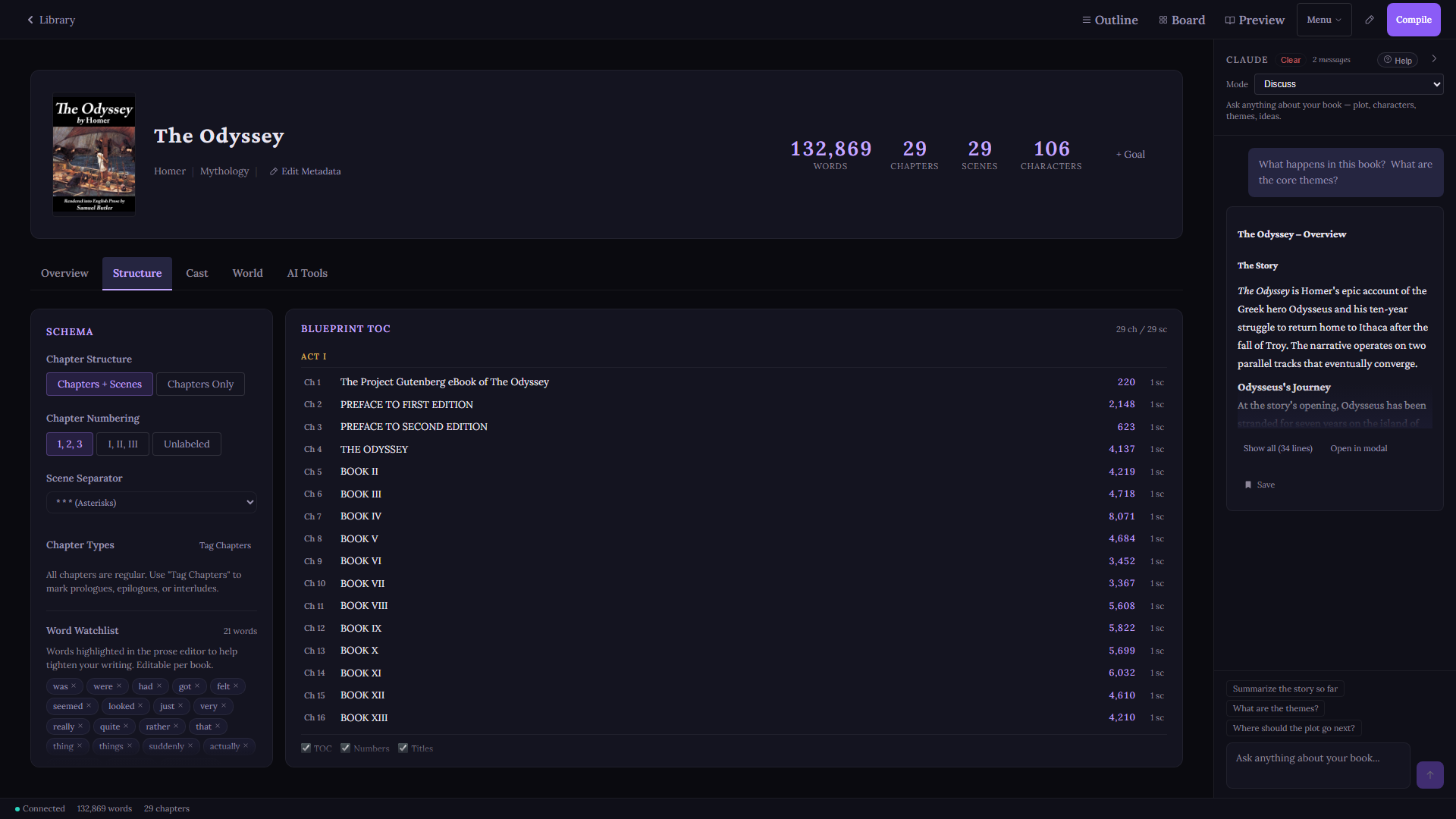
Structure tab · chapter outline, book settings, word watchlist
Your book, organized the way a book actually works. Not a folder full of documents. A living hierarchy of books, acts, chapters, and scenes that you can reshape at any point.
Rich text editing built for writers, not word processors. Auto-save, focus mode, and a distraction-free environment so you can think about the story. Not the software.
Toggle a panel in the toolbar to see your overused words (was, just, very, really, that, quite) with occurrence counts and colour-coded severity. Cut weak language before it reaches your editor.
Switch between views without leaving your book. Every view is always up to date. No separate planning app needed.
| Scene | Words | Status | POV | Characters |
|---|---|---|---|---|
| ACT I | ||||
| The Desert | 1,240 | Final | Roland | Roland, Jake |
| The Oracle | 887 | Draft | Jake | Jake, Oracle |
| Into the Mountains | 1,102 | In Progress | Roland | Roland, Susannah |
| The Speaking Demon | 654 | Draft | Susannah | All |
A spreadsheet-style table of every scene across every chapter. Columns for Chapter, Scene Title, Word Count, Status, POV Character, Synopsis, and Tagged Characters. All columns sortable. Filter by text search or status.
Act separator headers when acts are enabled. Parallel data loading keeps it fast even on 50-plus scene books. Click any row to jump directly to that scene.
Three views of the same story. Corkboard lays out index cards colour-coded by scene status or POV character, in three card sizes (compact, standard, expanded). Timeline arranges scenes chronologically across chapters. Characters groups scene cards by POV.
Group by Chapter, Act, Status, or show all ungrouped. Filter by chapter. Click any card to open that scene.
View reference material alongside your current scene. Options for the reference pane: scene notes, another scene from any chapter, character profiles, or the Story Bible. Useful for keeping continuity while you write forward.
Full deep immersion. Hides the sidebar, AI panel, topbar, and path bar. Only the prose editor remains, centred on screen with generous padding. A floating word count overlay is the only UI element that stays.
Three visual themes. Press Ctrl+Shift+Z to enter, Esc to exit. A step beyond standard Focus mode, which keeps the topbar visible on hover.
Your full manuscript rendered in reading order: all chapters, all scenes, concatenated with scene separators. Scrollable. Click a scene in the sidebar to jump directly to it in the preview. Font size controls. Compatible with Focus mode.
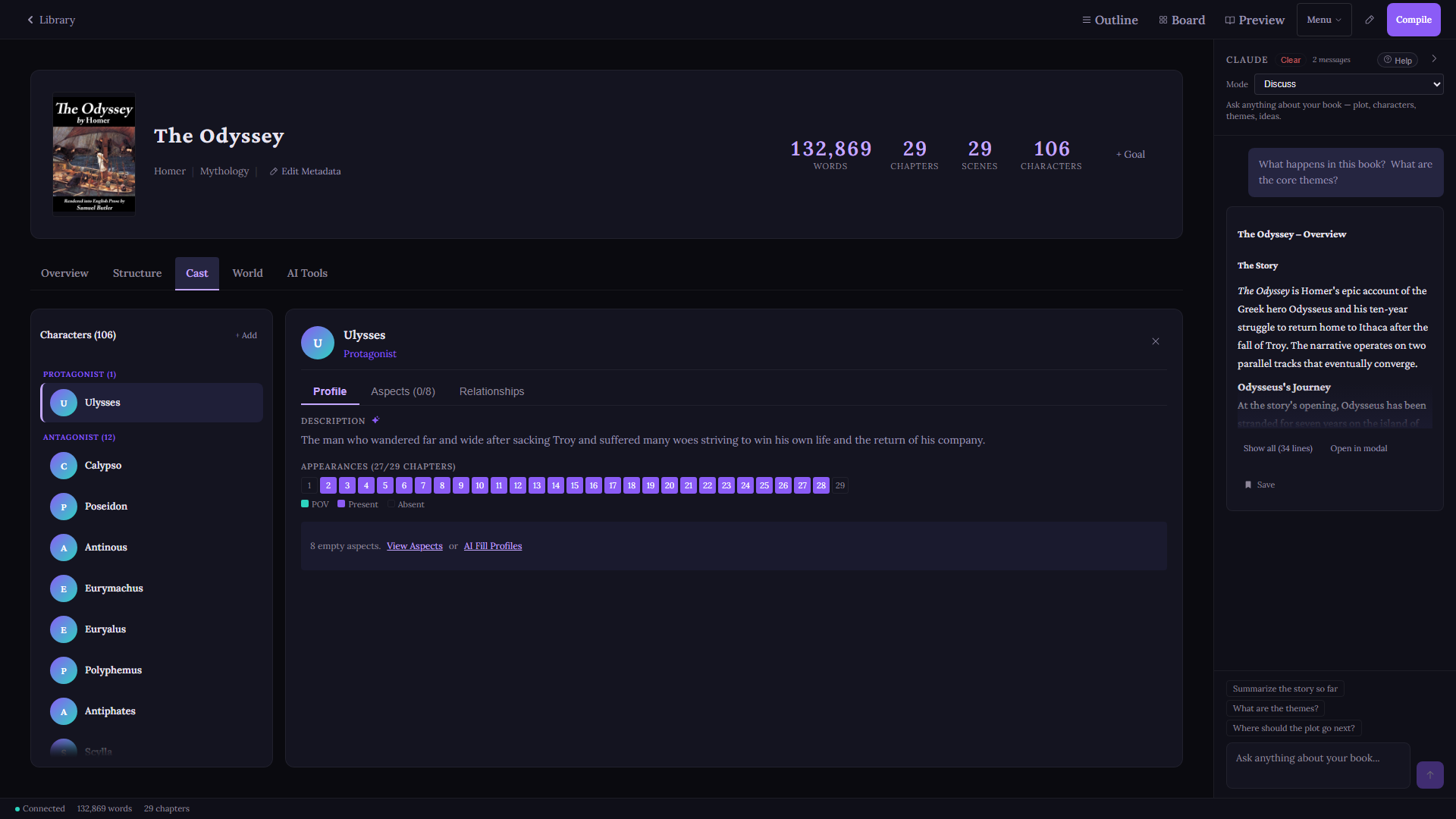
Cast tab · 106 characters, appearance heatmap, profile editor
Write naturally. GrimoireScribe reads your prose as you write, detects characters and their aliases automatically, and tags them to every scene they appear in.
Continuity errors surface before your editor finds them. See exactly which scenes each character appears in, sorted by appearance order.
Bidirectional relationship links between any two characters: ally, enemy, family, mentor. Both directions stored and surfaced. Build the social graph of your story without a separate tool.
A colour-coded chapter grid showing where each character appears across your manuscript. Spot gaps in a character arc, accidental absences, or crowd scenes at a glance.
Context-aware name generation with cultural filters: Fantasy, Nordic, Celtic, Arabic, Japanese, Greek, Slavic, and more. Phonetic avoidance of existing character names built in.
The Story Bible is a browsable, read-only panel that surfaces the full knowledge index your AI backend has built from your manuscript. Five sections, always current.
Filter by section. Search within. Counts shown in every filter button. The Story Bible is the reader-facing view of the knowledge index that powers every AI call.
Upload world documents (lore bibles, maps, timelines, histories) and GrimoireScribe retrieves only what's relevant to the scene you're writing.
No more pasting your entire world bible into every prompt. Retrieval surfaces the right notes automatically, in context, every time. Keyword search works locally out of the box. Semantic search is available through optional cloud or local embedding models.
Optional upgrade: Voyage AI embeds your world documents into vector space using voyage-4-lite (free tier: 200M tokens/month). At query time, cosine similarity ranking selects the most relevant passages from your lore. Falls back to keyword scoring when Voyage is not configured. Bring your own API key.
Every AI request automatically injects your book summary, writing style guide, character profiles, relevant world notes, and the prior scene. You ask the question. GrimoireScribe assembles the context.
Claude, GPT, Grok, Gemini, Mistral, DeepSeek, or MiMo for cloud writing. Local AI via Offline Mode for fully private, zero-cost operation. Configure a different model per mode. No GrimoireScribe credits. No markup. Ever.
Skip every API key. The full manuscript studio, character scribing, world building, and export all work completely offline. AI is opt-in. Not a requirement.
Draft prose for a scene with your full manuscript context pre-loaded. A starting point, not a final product. You decide what earns its place.
Improve existing prose: tighten pacing, sharpen dialogue, cut adverbs, match your established voice. Line-level revision that knows how you write.
Generate a full chapter draft from a brief. Review scene by scene. Nothing is auto-inserted. Every paragraph waits for your approval.
Multi-turn conversation about your plot, characters, or structure. The AI has read your whole manuscript. Use that.
Describe what needs to happen and get a scene drafted from your synopsis. For when you know where you're going but the blank page won't budge.
Chat across every book in a series simultaneously. Full character lists and chapter context from every volume. Continuity errors don't hide.
Highlight any passage in your prose. Get back rich sensory alternatives: how the same moment smells, sounds, feels in the body, tastes, sits in peripheral vision. Concrete, not vague. Your voice, amplified.
Useful for first-draft passes that need grounding, and for revision sessions where a scene reads flat.
A structured creative generator for the moments when the story stalls. Three output modes: plot twists that fit the logic of what you've already written, character secrets that recontextualise what the reader knows, and what-if scenarios for key decision points.
Every suggestion is grounded in your actual manuscript context, not generic creative writing advice.
Run a full AI audit of your manuscript for timeline inconsistencies, character contradictions, plot holes, world-building errors, and voice shifts. Results are severity-rated so you know what actually needs attention before submission.
Catches the kind of errors a line editor finds on page 300 that traces back to a decision you made on page 12.
Six structural frameworks applied as scaffolding when you create a new book: Hero's Journey, Three-Act, Save the Cat, Snowflake, Fichtean Curve, Seven-Point. Each creates placeholder chapters and scenes with structural notes.
Not a rigid outline. A starting shape to push against, fill in, or discard when the story decides it knows better.
knowledge.json maps every chapter and scene title to its ID, tracks character appearance data, and stores chapter metadata. The fast-lookup layer for routing queries.
SQLite FTS5 full-text search. Every scene indexed for topic queries. "Where does Ezra talk about the prophecy?" answered in milliseconds without loading a single scene file.
Per-chapter summary files and per-character arc files, AI-generated and stored in your book directory. Discuss mode reads these instead of loading full prose, keeping context efficient.
Every AI mode uses a writing style guide to match your voice. GrimoireScribe ships with 15 fully-developed presets, each a detailed craft document with genre-specific technique, prose rules, and structural guidance. Not a list of adjectives.
Build your own from scratch or copy any built-in as a starting point. Preview before applying. Switch per-book without affecting other projects.
Same opening premise. Same AI model. One with the GrimoireScribe Fantasy preset applied. One without. Both unedited.
The first thing he knew was the sound.
Not wind. Not exactly. Something beneath the wind, a low and pressureless moan that did not
come from any direction but seemed to rise from the ground itself, from the frozen earth
pressed against his cheek, from the white nothing stretching out in every direction he had
not yet looked.
He opened his eyes.
The sky was the color of old iron. The snow around his face had melted slightly from his body
heat and then refrozen, leaving a shallow impression shaped vaguely like a man. He pushed
himself up and his arms shook. His ribs sent a sharp pulse through his left side when he breathed.
No em dashes. Specific sensory detail. Precise over generic.
The cold came before anything else.
Not gradually, not as a slow creeping awareness - it arrived all at once, absolute and
merciless, like a verdict. He gasped into wakefulness, and the air that flooded his lungs
was so sharp it felt like swallowing broken glass. His body convulsed once, violently,
before some deep animal instinct clamped down on the panic and made him be still.
He was lying face-down in the snow.
He didn't know how he knew that word. Snow. He didn't know how he knew anything - the word
for the colorless sky pressing down above him like a slab of pale stone, the word for the
bare black trees that jutted from the frozen earth at wrong angles.
Em dashes. Stock similes. Generic atmosphere.
Most world-building tools ask you to fill forms. The Living Grimoire asks you questions. Over three phases of dialogue, it pulls your magic system out of your head and turns it into a structured, searchable Grimoire document that lives in your world notes.
Not a template. A conversation. You describe what you have. It probes what you haven't thought about yet. Then it codifies everything into nine organized sections, including a ruling-out log: a catalog of explicit constraints that protects your system from creep as you write.
The Grimoire integrates directly with RAG retrieval. Every scene you write, the relevant rules surface automatically.
Learn more about the Living GrimoireThe ruling-out log records what can't exist in your system. As powerful as what can.
Every API call is logged with real dollar estimates: provider, model, mode, and operation. No mystery bills. No end-of-month surprise.
Filter by date range, provider, model, or operation type. Drill into per-call logs. Export everything to CSV or JSON. Set custom per-token prices if you're on a negotiated rate.
| Provider | Model | Tokens | Est. Cost |
|---|---|---|---|
| Anthropic | Claude Sonnet 4.6 | 612K | $8.23 |
| OpenAI | GPT-5.5 | 198K | $3.41 |
| xAI | Grok 4.3 | 37K | $0.83 |
Compile your entire manuscript to a polished output format in one click. Presets for every destination: Kindle, manuscript submission, trade paperback print.
Import from Scrivener, Word, plain text, or Markdown. GrimoireScribe walks you through it step by step, placing content exactly where you want it.
GrimoireScribe reads and writes native .scriv projects. Import your entire back catalog. Keep exporting back to Scrivener while you transition. Or use both in parallel, indefinitely.
It's a two-way door. No lock-in, no pressure, no migration cliff.
| Feature | GrimoireScribe | Scrivener | Sudowrite | NovelCrafter |
|---|---|---|---|---|
| Book/Act/Chapter/Scene hierarchy | ✦ | ✦ | · | ✦ |
| Book cover art (upload, crop, compile output) | ✦ | ✦ | · | · |
| Series management (multi-book ordering + stats) | ✦ | Partial | · | · |
| Drag-and-drop reordering | ✦ | ✦ | · | ✦ |
| Manuscript Outline (spreadsheet view) | ✦ | ✦ | · | Partial |
| Visual Plot Board (corkboard + timeline) | ✦ | ✦ | · | · |
| Split-Screen Editor | ✦ | ✦ | · | · |
| Zen / Distraction-Free Mode | ✦ | ✦ | · | · |
| EPUB / DOCX / PDF export | ✦ | ✦ | · | Partial |
| Scrivener .scriv import/export | ✦ | Native | · | · |
| Feature | GrimoireScribe | Scrivener | Sudowrite | NovelCrafter |
|---|---|---|---|---|
| Story Bible | ✦ | · | · | Partial |
| Automatic character detection | ✦ | · | · | · |
| Character Relationship Map | ✦ | · | · | · |
| Character Appearance Heatmap | ✦ | · | · | · |
| Manuscript Continuity Checker | ✦ | · | · | · |
| Story Structure Templates | ✦ | · | Partial | Partial |
| Feature | GrimoireScribe | Scrivener | Sudowrite | NovelCrafter |
|---|---|---|---|---|
| 7 AI providers (Claude/GPT/Grok/Gemini/Mistral/DeepSeek/MiMo) | ✦ | · | 1 | Partial |
| AI writing (5 modes) | ✦ | · | ✦ | Partial |
| AI Brainstorm + Sensory Expansion | ✦ | · | Partial | · |
| World building with retrieval (local + cloud) | ✦ | · | · | Partial |
| Voyage AI semantic retrieval (RAG) | ✦ | · | · | · |
| Per-mode AI model configuration | ✦ | · | · | · |
| Writing style presets (genre-tuned) | ✦ | · | · | · |
| Series multi-book AI chat | ✦ | · | · | · |
| Feature | GrimoireScribe | Scrivener | Sudowrite | NovelCrafter |
|---|---|---|---|---|
| Dead Words Filter | ✦ | · | Partial | · |
| Usage & cost tracking | ✦ | · | · | · |
| Local-first (no cloud) | ✦ | ✦ | · | · |
| Bring your own API keys | ✦ | N/A | · | ✦ |
| No subscription required | ✦ | ✦ | · | · |
| Windows | ✦ | ✦ | Web | Web |
| Mac | Soon | ✦ | Web | Web |
| iPad / Mobile | Soon | iOS | Web | Web |
One-time purchase. All future major versions included. 30-day refund, no questions.